

Host dashboard
The Dashboard is the first page you see in host mode. It gives you an overview of all your listings on one page. Every figure is calculated from your own listings and bookings only.
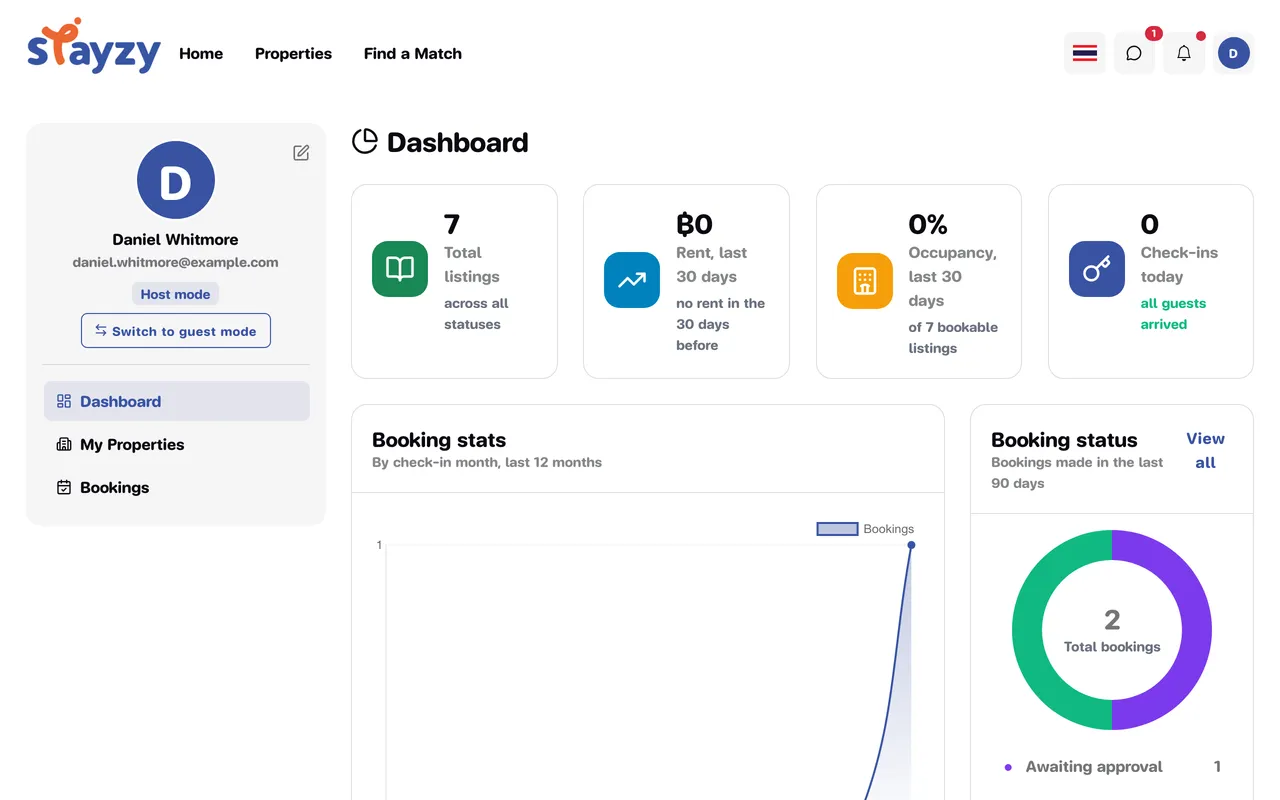
Summary cards
Section titled “Summary cards”| Card | What it shows |
|---|---|
| Total listings | How many listings you have, across all statuses (deleted listings aren’t counted) |
| Rent, last 30 days | The rent for nights guests stayed in the last 30 days, with the percentage up or down vs the 30 days before |
| Occupancy, last 30 days | The share of nights that were occupied across your bookable listings (the number of listings counted is shown underneath) |
| Check-ins today | How many guests are due to check in today, and how many haven’t arrived yet |
How rent is counted
Section titled “How rent is counted”Rent, last 30 days counts rent for the nights that actually fall within those 30 days, not a whole booking’s total on a single day. A six-month stay, for example, only contributes the nights that fall within the last 30 days. Platform fees are left out.
Booking stats
Section titled “Booking stats”A line chart of bookings by check-in month over the last 12 months.
Booking status
Section titled “Booking status”A doughnut chart of bookings made in the last 90 days, by status — such as Awaiting approval, Confirmed, Checked-in and Cancelled — with Total bookings in the middle. View all takes you to the bookings list.
In this chart, Confirmed also includes completed stays, and Cancelled also includes declined and expired requests.
Upcoming bookings
Section titled “Upcoming bookings”The table at the bottom shows up to five bookings with a check-in from today onwards, including requests still waiting for your answer.
- Search by guest name or booking number.
- Sort by Check-in: soonest first or Check-in: latest first.
- Click View to open a booking, or View all for the bookings list.