

Delete your account
If you no longer want to use Stayzy, you can delete your account yourself. Deletion is not final straight away: the account enters a 30-day grace period during which you can change your mind and restore it. After 30 days your data is anonymized and can no longer be restored.
Before you delete
Section titled “Before you delete”- Bookings still in progress should be completed or cancelled first.
- If you are a host, every property you have listed is removed from the platform too.
- Want a copy of your data? Ask the Stayzy team before you delete. See FAQ and contact.
Delete from the privacy pages
Section titled “Delete from the privacy pages”-
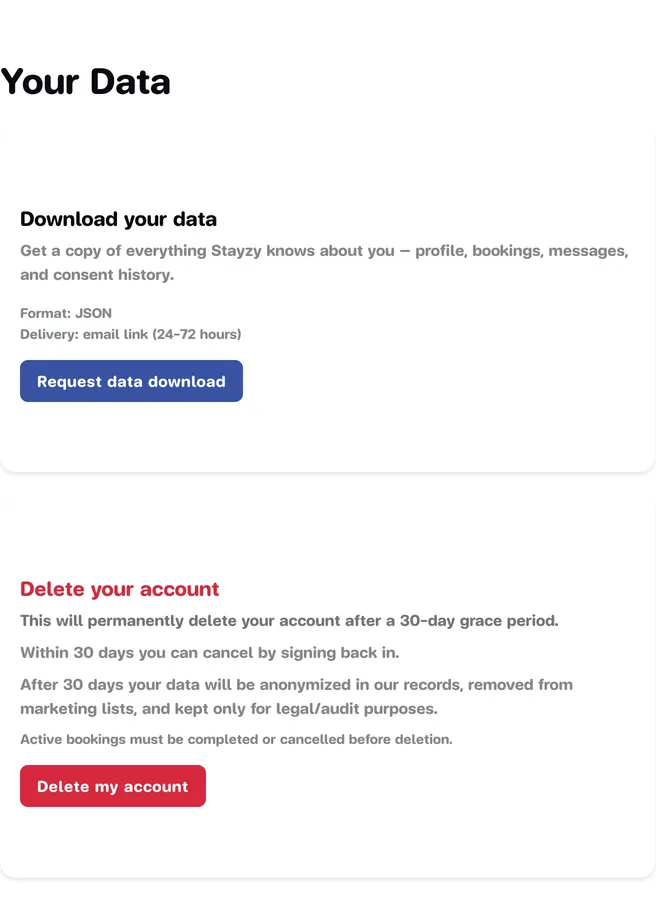
Open the profile menu at the top right, choose My Profile, press Privacy in the left-hand menu, then choose Your Data.
-
In the Delete your account card, read the warning and press Delete my account.
-
In the Delete your account window, type
DELETE MY ACCOUNT(all capitals) in the confirmation box. You can add a Reason (optional) if you like.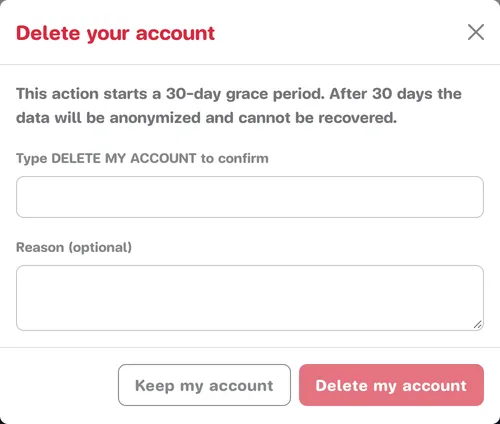
-
Press Delete my account. If you change your mind, press Keep my account.
-
You see Account deletion scheduled and are signed out.
Delete from the Delete Account menu
Section titled “Delete from the Delete Account menu”The Delete Account item in the left-hand menu deletes your account too.
-
Press Delete Account in the left-hand menu.
-
Read the warnings, then tick Yes, I want to delete my account.
-
Press Delete my account, then Delete account in the Confirm account deletion window. If you change your mind, press Keep my account.
-
You are signed out and taken to the sign-in page.
What happens after you delete
Section titled “What happens after you delete”| When | What happens |
|---|---|
| Straight away | You are signed out and cannot use the account. |
| Within 30 days | The account can still be restored. If you try to sign up again with the same email, you are told to sign in and restore it instead. |
| After 30 days | Your data is anonymized, removed from marketing lists, and kept only for legal and audit purposes. It can no longer be restored. |
Restore within 30 days
Section titled “Restore within 30 days”-
Go to the sign-in page and sign in with the email and password of the deleted account.
-
You are taken to the restore page, which shows when the account was deleted, the date it will be deleted for good, and how many days are left. This page is currently in Thai only.
-
Press กู้คืนบัญชีของฉัน (“Restore my account”), then ยืนยัน กู้คืน (“Confirm, restore”).
Once restored, your account and the properties linked to it are back in use, and you are signed in. See Sign in and sign out for more.