

Track your request
Once you send a request, the host has a set time to accept or decline it. Meanwhile you can check its status, chat with the host, or withdraw it. This page explains what happens next.
The request-sent page
Section titled “The request-sent page”Right after sending, you see Your booking request has been sent.
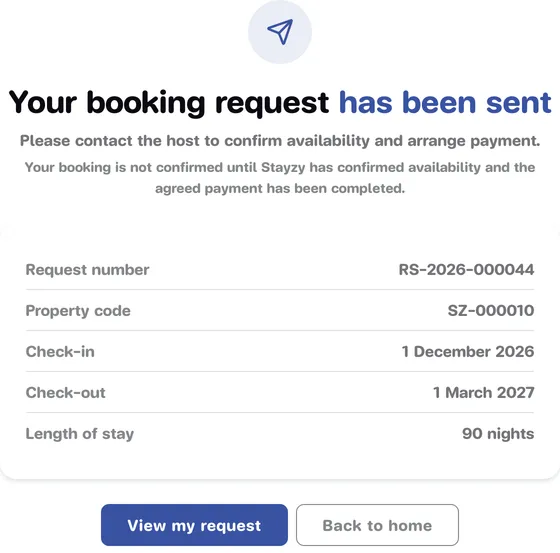
- Request number: starts with
RS-. Use it to refer to this request. (Once confirmed, the booking gets its own number starting withBK-.) - Property code, Check-in, Check-out and Length of stay.
- Press View my request to open the request, or Back to home.
You can always come back to it later from My Bookings (see My bookings).
How long the host has to answer
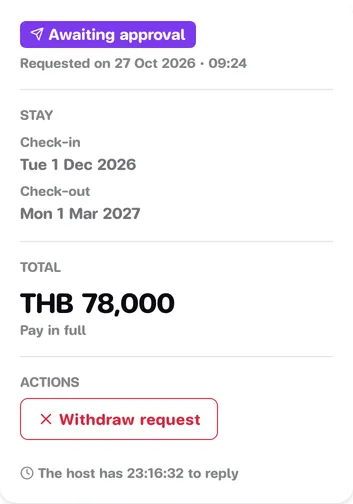
Section titled “How long the host has to answer”The host has 24 hours to answer from the moment you send the request. If your check-in is sooner than that, the deadline is check-in time on that day instead.
On the request’s page the status reads Awaiting approval, with a countdown: “The host has … to reply”.
What can happen
Section titled “What can happen”The host accepts: your booking is confirmed
Section titled “The host accepts: your booking is confirmed”The status changes to Confirmed at once. There is no payment step on the website. You get a booking number
BK-… and a notification both on the site and by email. The host will contact you about paying the rent and any
deposit.
The host’s contact details (phone and email) appear on your booking from the day before check-in. See Contact your host.
The host declines
Section titled “The host declines”The status changes to Declined and the page shows the reason, e.g. “Declined · Reason: Dates unavailable”. Sometimes the host adds a note. Reasons you may see:
- Dates unavailable
- Not a fit for this property
- Property not available
- Other
- Dates already booked: declined automatically because the host accepted another guest’s request for overlapping dates.
You can send a new request for other dates, or look at other places, straight away.
The request expires
Section titled “The request expires”If the host doesn’t answer in time, the status becomes Expired with “Request expired — the host did not reply”. Send a new request if you’re still interested.
Withdraw a request
Section titled “Withdraw a request”Changed your mind while the request is still waiting for the host? You can withdraw it yourself.
-
Open the request from My Bookings and press Manage booking (or View my request on the request-sent page).
-
Under Actions, press Withdraw request.
-
The Withdraw this request? window says the host will be told and that this cannot be undone. Press Withdraw to confirm, or Keep request.
You can only withdraw while the request is waiting for an answer. Once the booking is confirmed, cancel it instead (see My bookings).
Notifications you’ll get
Section titled “Notifications you’ll get”Stayzy tells you through the notification bell on the site and by email to the booker when:
- the host accepts and your booking is confirmed,
- the host declines your request (or the dates were booked by someone else),
- the request expires because the host didn’t answer.
See Notifications for more.